4 minute read
Building pg_glimpse: A Postgres Monitoring TUI
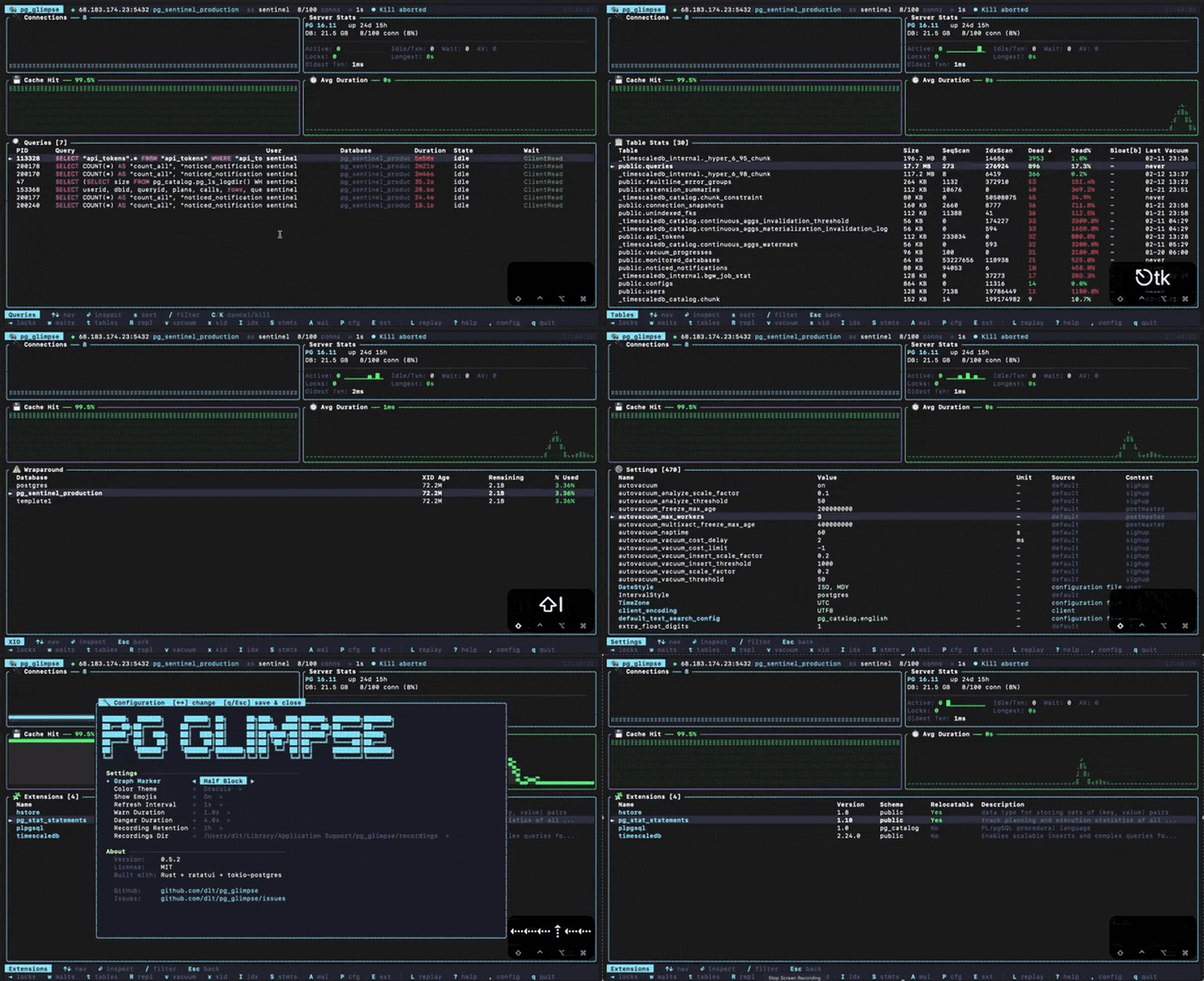
pg_glimpse
pg_glimpse is a TUI Postgres monitoring application. Think of pg_activity, with a slicker UI and a few extra tools. Before I built this tool I was constantly using ad hoc queries to monitor production databases. Now I have something that fits in my terminal-based workflow. It started as a proof of concept I built with Claude Code in a couple of afternoons, and grew from there.
It covers:
- Active queries with wait events
- Lock blocking chains
- Table and index stats (bloat, sizes, scans, dead tuples)
- Replication lag
- Live vacuum progress
- Transaction wraparound risk
- pg_stat_statements metrics
- WAL rate and checkpoint stats
- Sparkline graphs for connections, TPS, cache hit ratio, query times, and locks
It automatically records the statistics collected during a monitoring session, so you can replay them later to better understand what happened during an incident, or to share a session with a teammate.
While developing pg_glimpse I learned not only more about Postgres internal catalog tables, but also how to steer a coding agent to produce a useful tool while maintaining a high bar for codebase quality. I also learned a bit more about Rust async, something I hadn’t worked with before.
Small iterations beat big prompts
I built this project with heavy assistance from an AI-agent tool, one of the first projects I’ve worked on this way. In earlier AI-assisted projects I’d been burned by the volume of low-quality code and subtle bugs the agents introduced; everything needed careful review and re-testing, and I was constantly redefining prompts and reinforcing project rules. So this time correctness was the priority. I wanted an experienced Rust programmer to read the code and find nothing to complain about.
That meant working in small iterations: one feature or one fix per step, then open the app and look. The point wasn’t speed. It was keeping the diff small enough that I could actually see what changed. For example: the first time the connections graph went in, the diff looked fine. When I opened the app against an idle server, the bars sat near the top of the panel. The chart was auto-scaling to whatever was in the data window, so 9 active connections gave a ceiling of 10, making a database with 91 free slots look like it was about to tip over. The fix was passing max_connections from pg_settings as the ceiling instead. The diff itself looked fine. It was opening the app that caught it. And because the change was small, the weird bars pointed straight at the cause. Buried in a 600-line “build the whole stats panel” diff, that signal disappears.
Under the hood
The architecture consists of an async Tokio event loop that triggers at regular intervals. At each interval several queries run against the catalog tables, and their results are aggregated in a PgSnapshot struct. This struct is printed in the form of tables and graphs on the terminal using the ratatui library.
The tests are supported by a Rust crate called “insta”. This crate is responsible for snapshot testing. Text representations of the UI are saved in snapshots and the unit tests make assertions based on them.
After the tool settled on its feature set, I wrote unit and integration tests for it. My goal was to guarantee that the tool supported different Postgres versions. Moreover, I knew I needed to go through several refactoring rounds, and the tests would help me avoid regressions. I configured a Rust linter in CI and tackled findings. I also generated a report with a prompt that went more or less like “As a staff Rust engineer, rate this project. What is it doing right and what can be improved?”. The LLM output was a .md document that I used to guide my refactoring efforts.
Shipping
After the refactoring was completed, I packaged it so that it could be installed via Homebrew, Cargo, and Scoop. It was also time to handle some issues, as well as some changes requested by the first users. They mostly revolved around compatibility with different OSes, Postgres versions, and cloud services.
The lesson I keep coming back to: small iterations beat big prompts. Reviewing one diff at a time keeps the quality bar high without slowing things down much, and that’s what made the difference on this one. This is why I don’t fully trust Ralph loops, or /goal yet.
The tool’s source code and installation instructions can be found in the GitHub repository.